

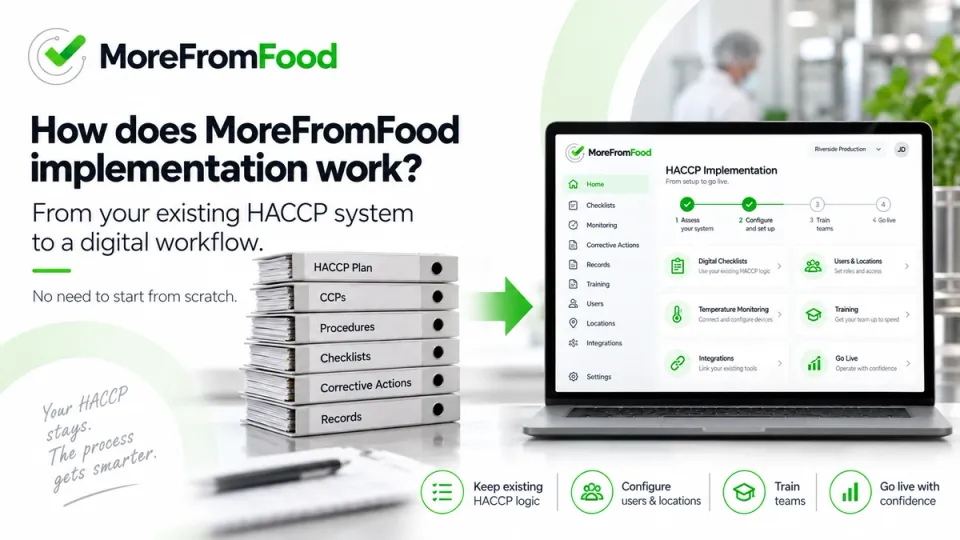
How Does MoreFromFood Implementation Work?
Deciding to digitize HACCP is one thing. Actually going through implementation is what most people are quietly nervous about — how much of their time it'll take, whether it'll disrupt daily operations, and whether they'll be left to figure out a new system on their own. Here's what actually happens, step by step.
MoreFromFood implementation starts with understanding your existing HACCP plan, forms and locations, then configuring the system around your actual process — either by our team or yours — before training staff and going live. For a single site, this typically takes about a week; for multi-site businesses, four to eight weeks, depending mostly on how quickly information and decisions come back from your side.
Key takeaways
- Implementation starts with a conversation, not a form to fill in — we get to know your current process before anything gets built.
- You don't need an existing HACCP plan to get started — we can help create or update one if needed.
- You choose who does the digitization work: our team builds it from your documentation, or we train someone on your side (usually a technologist) to build and maintain it themselves.
- Temperature sensors are wireless and genuinely quick to install — often a matter of minutes per sensor once the gateway is in place.
- After go-live, you get a dedicated account manager plus on-call support, not just a support ticket queue.
In this article
- What do we need from you before starting?
- Do you need a new HACCP plan, or can you keep your existing one?
- How do your paper or Excel forms actually become digital?
- Who sets up users, roles and locations?
- What does staff training look like?
- How are temperature sensors installed?
- Can this connect to our other systems?
- How long does implementation actually take?
- What happens after go-live?
- FAQ
What do we need from you before starting?
The short answer: your current documentation, and a conversation.
In practice, that means your existing HACCP plan (if you have one), your control forms with whatever instructions go with them, and a list of your locations and sub-units. For larger operations, this is often organized by department — production line 1, production line 2, warehouse, packaging, and so on. Alongside that, it helps to have your other reference lists ready too: suppliers, staff, raw materials, cleaning products — anything that would naturally become a dropdown menu inside the system rather than a free-text field.
Before any of that gets built into the platform, we talk through how your operation is currently organized — how units and teams are structured, who manages what — so the system reflects how you actually work rather than a generic template.
That conversation also covers a handful of decisions that are much easier to make upfront than to redo later: whether each employee gets their own login or teams share access, who can see and edit what, who receives which alerts and through which channel (email, push notification, SMS), what reports you want and how often, and how often each checklist should run so the system knows when to remind someone if it's missed.
Do you need a new HACCP plan, or can you keep your existing one?
You can keep what you have — your existing plan is the starting point, not something we ask you to redo. If you don't have a formal HACCP plan yet, or want to update an existing one, that's also something we can help with directly, rather than treating it as a separate project you'd need to arrange elsewhere first.
How do your paper or Excel forms actually become digital?
There are two ways this happens, and which one fits depends on your setup.
We build it for you. You send us your documentation, and our team configures the full platform and mobile app based on it. This is the more common route, especially for smaller operations (a single HoReCa site, for example) or larger businesses without someone specifically freed up to take this on.
Your team builds it. One person on your side — usually a technologist — is trained to build and configure the system directly, based on guidance from us. For larger or more complex operations, this often works out best long-term: once trained, that person can make future changes themselves, quickly and exactly how they want them, without waiting on us for every small edit.
Either way, remote support from our team is available throughout — the choice is really about how hands-on you want to be during setup, not about one path being more supported than the other.
Who sets up users, roles and locations?
Either you or we can do this — but in practice, we usually handle the initial setup, simply because getting permissions and structure right from the start takes some dedicated time, and it's easier to get it right once than to untangle it later. Smaller day-to-day adjustments after that — adding a new user, tweaking a permission — are usually simple enough that your team handles them directly.
What does staff training look like?
This depends on what the training is actually for.
Training to use the system day-to-day is intentionally light — for most staff, a single session of up to an hour is enough, largely because the app is designed to guide people step by step rather than requiring them to remember a process. Training can be delivered live, remotely, or through pre-recorded or written materials, depending on what works best for your team. Usage training like this is typically included at no extra cost, aside from live sessions, which are agreed as part of your offer or contract.
Training to configure the system yourself — for the technologist or team lead who'll be building and maintaining forms — is a different scope entirely: several hours across multiple sessions, tailored specifically to your setup rather than generic instructions. This is usually a paid part of implementation, reflecting the time and customization involved.
How are temperature sensors installed?
More simply than most people expect. Sensors are wireless, so installation is largely a matter of mounting them in the relevant fridge, freezer, cold room or surrounding area and switching them on — no wiring involved. A gateway is set up nearby first; once the sensors are powered on, they connect to it within minutes and start sending data straight into the system.
Installation itself can go either way: our team can install everything on-site following a quote, or we ship the sensors and gateway to you along with remote support (typically over the phone) if your own team prefers to install them. Either way, our back-office team configures and calibrates each sensor against its gateway before it ships or before on-site installation — that part always happens on our end. Once sensors are live, you have full access to configure your own alerts and reports.
Can this connect to our other systems?
Yes. We have in-house developers who've built a number of integrations already — Power BI comes up most often, and we've also connected with SAP. Some businesses integrate with internal systems for traceability, raw material ordering, or ticketing, even where MoreFromFood already covers similar functionality natively, simply because of how their broader operations are set up. Integrations like this are typically a paid add-on, scoped to what's actually needed.
More broadly, this reflects something we think matters: MoreFromFood isn't a closed system. We're open to connecting with other digital tools you already use, and to developing new functionality beyond standard integrations when it genuinely fits your operation. We've had businesses choose us specifically after hitting a dead end with a more closed platform elsewhere — investing time in a system that turned out not to bend when their needs changed.
How long does implementation actually take?
As a general guide:
- Single location — roughly one week to get users, checklists and notifications fully set up, though this depends partly on how quickly your team can turn around information and decisions.
- Multi-site — typically four to eight weeks, mainly driven by how much internal coordination and resource availability is needed on your side.
- Sensor hardware — smaller orders ship from stock right away; larger orders typically take around two weeks to prepare and send. On-site installation timing depends on technician availability and location — outside the Balkan region specifically, where we don't have contracted local installers, this step can take a bit longer.
What happens after go-live?
You're assigned a dedicated account manager as your ongoing point of contact — reachable by phone, email or chat — plus access to on-call support for anything urgent if your account manager happens to be unavailable. Support doesn't end at go-live; it's built to continue as your actual point of contact going forward.
FAQ
Do we need to prepare anything special before the first conversation? Not really — having your current forms, HACCP plan (if you have one), and a rough list of locations on hand helps, but the initial conversation is designed to figure out what you actually have and need, not to test your preparation.
Can different employees have different levels of access? Yes — access can be set per individual or per team, and permissions can be scoped down to specific functionality, data visibility, editing rights and which locations someone can see.
Do we have to choose between MoreFromFood building the system or our team doing it? No — many businesses land somewhere in between, with our team handling the initial setup and a technologist on your side taking over smaller changes afterward.
Is training required for every employee, or just certain roles? Day-to-day usage training is typically given to everyone who'll be completing checks, and it's brief. Deeper configuration training is usually limited to whoever will be maintaining the system going forward, such as a technologist.
What if we're not in the Balkan region — does that change anything? The core process is the same; the main practical difference is on-site sensor installation timing, since we have contracted local installers within the Balkan region specifically, and installation elsewhere is arranged case by case.
Related reading
- How to Digitize HACCP: A Step-by-Step Guide
- Digital HACCP ROI: How Much Is Paper Really Costing You?
- What Should HACCP Software Include? 15 Features to Compare
Ready to talk through your own setup?
The clearest way to know what implementation would look like for your business is to walk through your actual HACCP plan, sites and process with us directly.
Book a demo or email info@morefromfood.com.
