

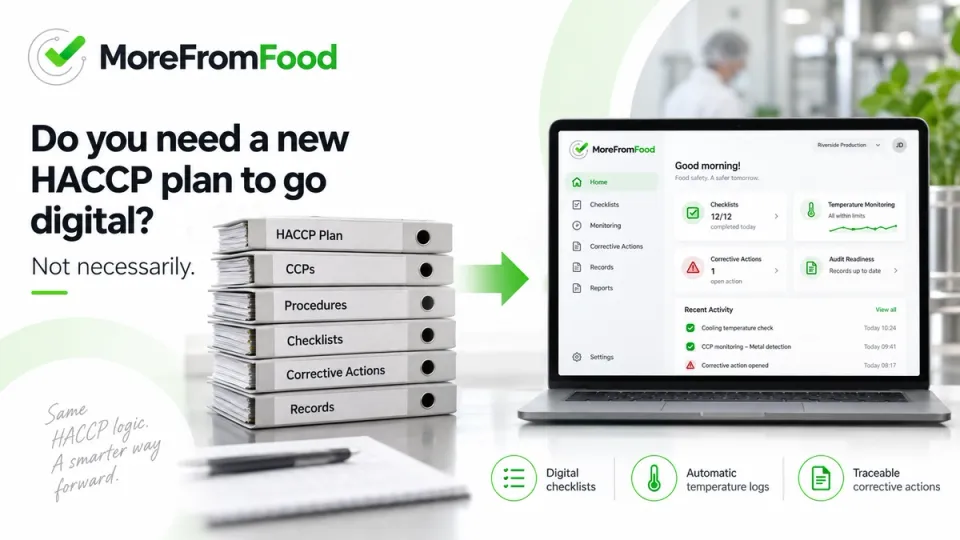
How to Digitize HACCP: A Step-by-Step Guide for Food Businesses
Paper HACCP works fine — until the day an auditor asks for a record from three weeks ago and nobody can find it. That's usually the moment food businesses start asking how to digitize HACCP, and where to even begin.
Digitizing HACCP means moving your existing food safety plan — checks, critical limits, temperature logs and corrective actions — from paper and spreadsheets into a connected digital system. You don't need to rewrite your HACCP plan or start from zero. In most cases, your current forms and control points are rebuilt as mobile checklists, automated sensors take over manual temperature logging, and every record becomes searchable and timestamped instead of sitting in a binder.
Key takeaways
- Digitizing HACCP converts your existing plan into digital workflows — it isn't a new food safety plan.
- The paper problems that cost the most time (missing entries, lost binders, retrospective logging) are also the easiest ones to remove digitally.
- A realistic project moves through 8 steps, from reviewing current documentation to training staff and reviewing results.
- EU food hygiene law requires a permanent, verifiable HACCP procedure — a standard paper struggles to prove consistently during audits.
- Most businesses start with one module — often temperature monitoring or daily checklists — and expand later.
In this article
- What does digitizing HACCP mean?
- Why are food businesses moving away from paper HACCP?
- What HACCP processes can be digitized?
- How to digitize HACCP: 8 steps
- Can you digitize HACCP without changing your existing HACCP plan?
- How long does HACCP digitalization take?
- What does HACCP digitalization cost?
- What should you look for in a digital HACCP solution?
- FAQ
What does digitizing HACCP mean?
Digitizing HACCP is the process of converting the Hazard Analysis and Critical Control Points (HACCP) plan you already run — your checks, critical limits, monitoring procedures, corrective actions and verification records — into digital form. Instead of a technician filling in a printed sheet at the end of a shift, the same check is completed on a phone or tablet, in real time, at the actual control point. Temperature readings can be captured automatically by wireless sensors rather than copied by hand. Every entry is timestamped, attributed to a user, stored centrally, and available instantly — instead of filed away in a binder that may or may not be findable when an auditor asks for it.
Digitization changes how your HACCP plan is executed and recorded. On its own, it does not change what your HACCP plan says.
Why are food businesses moving away from paper HACCP?
Because paper struggles precisely at the moments it matters most: during an audit, an inspection, or when something goes wrong and you need to trace it quickly.
In practice, the same handful of problems show up across almost every food business still working on paper:
- Missing records — a check that was never filled in, discovered only once someone goes looking for it
- Retrospective entries — logs filled in from memory at the end of a shift, not at the moment of the check
- Paper archives — years of binders that take up space and make retrieval slow
- No central overview — a manager cannot see, in real time, which checks across which sites are overdue
- Manual temperature logs — readings copied by hand from a thermometer, with no way to verify they were taken at all
- Difficult audit preparation — days spent pulling and photocopying records before an IFS, BRCGS or internal audit
- Delayed corrective actions — a deviation gets noticed, but the follow-up is never formally tracked to closure
None of this reflects a careless team — these are structural limits of paper. Under EU food hygiene law, food business operators must put in place and maintain a permanent procedure based on HACCP principles (Regulation (EC) No 852/2004, Article 5) — a standard that's hard to demonstrate consistently when the evidence lives on loose paper across multiple locations.
What HACCP processes can be digitized?
Most of the day-to-day HACCP workload can be digitized without changing the underlying control point itself. Here's how the same process looks on paper versus digitally:
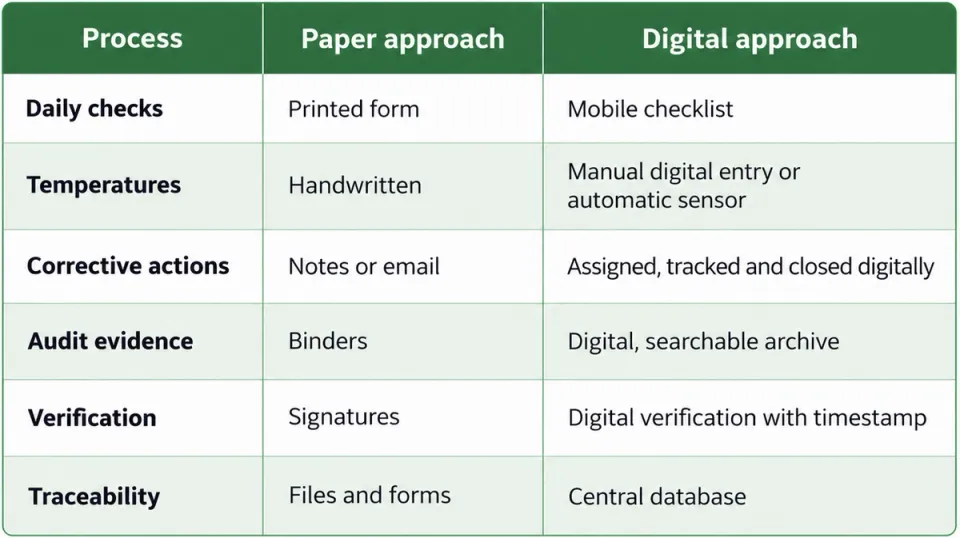
Most businesses don't digitize everything on day one. It's common to start with the highest-friction area — usually temperature monitoring or opening/closing checklists — and expand from there.
How to digitize HACCP: 8 steps
Step 1: Review your existing HACCP documentation
Before anything gets digitized, someone needs a clear picture of what already exists: the HACCP plan, the CCPs, the supporting forms, and who owns each one. This step alone often reveals which forms are genuinely used — and which have quietly stopped being filled in.
Step 2: Identify repetitive forms and records
Not every document deserves equal priority. Daily checklists and temperature logs are usually completed dozens of times a week and cause the most administrative load, which makes them the natural starting point — ahead of documents updated only occasionally.
Step 3: Convert checks into digital workflows
Existing paper forms are rebuilt as digital checklists: the same fields, the same critical limits, the same frequency — just completed on a phone, tablet or web platform instead of on paper.
Step 4: Define responsibilities and frequencies
Each digital check gets assigned to a role, location, shift or individual, with a set frequency. This is also where overdue-task alerts become possible — something paper has no real equivalent for.
Step 5: Automate temperature monitoring where possible
Wireless sensors placed in fridges, freezers, cold rooms and delivery vehicles remove the manual step entirely. Readings log automatically at set intervals, and out-of-range temperatures trigger an alert before a manual check would even have caught it.
Step 6: Create alerts and corrective-action workflows
A missed check, a temperature deviation or a failed control point should trigger a notification — not sit unnoticed until the next scheduled review. Corrective actions get assigned to a specific person, with a deadline and a digital record of how they were resolved.
Step 7: Train employees
Digital HACCP only works if the people completing checks are comfortable with the tool. Training is usually short — most staff already know how to use an app on a phone — but should cover both daily use and what to do when something goes wrong, like a sensor going offline.
Step 8: Monitor and improve
Once live, the plan doesn't disappear into a drawer. Digital records make it possible to spot patterns — a fridge that drifts out of range every Friday, a checklist consistently completed late — and adjust the plan accordingly.
Can you digitize HACCP without changing your existing HACCP plan?
Yes — and this is worth being direct about, because it's one of the more common misconceptions. Digitizing HACCP does not require writing a new HACCP plan.
Your critical control points, hazard analysis and critical limits were developed to reflect your actual process, and in most cases they remain valid after digitization. What changes is the execution and recording layer — how a check gets completed, how a temperature gets logged, how a corrective action gets tracked — not the food safety logic underneath it. A digital HACCP provider should be able to take your existing forms and documentation as the starting point for configuration, rather than asking you to redesign your food safety plan from scratch.
In practice, most businesses end up with close to zero routine paper once digitalization is complete — daily checks, temperature logs and corrective actions all move to the digital system. The exceptions tend to be edge cases: a backup paper log for the rare moment a site loses connectivity and offline sync isn't available, or physical signage required by local regulation. These are minor exceptions, not a reason to keep the core system on paper.
How long does HACCP digitalization take?
There's no single answer, since it depends on scope, but as a general pattern:
- A single-site business with a moderate number of checks (a restaurant, a hotel kitchen, a small production facility) can typically go from kickoff to live use within a few weeks.
- A multi-site or manufacturing operation with several locations, multiple HACCP plans and sensor installation takes longer — often weeks to a couple of months, largely driven by how much hardware needs to be physically installed.
- The step that most affects the timeline usually isn't software configuration — it's how quickly existing documentation can be gathered and shared with the team setting up the system.
What does HACCP digitalization cost?
Rather than quote a number that varies enormously by provider and scope, it's more useful to know what actually drives the cost:
- Number of locations — a single kitchen and a 12-site retail chain are very different projects
- Number and type of sensors — temperature monitoring hardware (probes, gateways, connectivity) is typically priced separately from the software
- Number of users and checklists — how many people need access, and how many distinct workflows need building
- Integrations — whether the system needs to connect to an ERP, MES or BI platform
- Support and training — onboarding and staff training can be bundled or billed separately
Most providers, MoreFromFood included, price based on your number of sites, users and modules rather than a flat rate — so it's worth getting a quote tailored to your setup rather than estimating from a generic price list.
What should you look for in a digital HACCP solution?
Once a business decides to move away from paper, the natural next question is what to actually compare between providers. At minimum, it's worth checking:
- Can it use your existing HACCP forms as a starting point, rather than forcing a rebuild?
- Does it support automatic temperature monitoring, not just manual digital entry?
- Is there a genuine audit trail — timestamped, attributable, unchangeable?
- Does it work offline, for sites with unreliable connectivity?
- Can it handle multiple locations from one account?
- Does it support the standards you actually need — HACCP, ISO 22000, IFS, BRCGS, FSSC 22000?
- Can it grow with you, from a single module (like temperature monitoring) to a full food safety platform?
We cover this comparison in detail — including a side-by-side look at paper, Excel and digital systems — in the next article in this series.
FAQ
Is digital HACCP legally recognized? Yes. EU food hygiene law doesn't require paper specifically — it requires a permanent, documented HACCP-based procedure. Digital records that are timestamped, attributable and retrievable satisfy that requirement the same way paper does, and are generally easier to produce on demand during an inspection.
Do we need new equipment to digitize HACCP? Basic digitalization (checklists, forms) usually only requires a phone or tablet your team already has. Automated temperature monitoring requires wireless sensors and, depending on the site, a gateway for connectivity — that's the main hardware investment in most projects.
Can small food businesses digitize HACCP too? Yes — smaller operations often see the switch pay off faster, since even one person managing checks across a small kitchen benefits from not chasing paper forms at the end of a shift.
What happens to our paper HACCP plan once we digitize? The HACCP plan itself — your hazard analysis, CCPs and critical limits — stays as your reference document. What moves into the digital system is how those checks are executed, recorded and tracked day to day.
Does digitizing HACCP replace the need for a HACCP consultant? No. A HACCP consultant or food technologist develops or reviews the plan itself. Digital HACCP software executes and records that plan — the two serve different purposes and are often used together, especially during initial setup.
Can we digitize only part of our HACCP system, like temperature monitoring? Yes. Many businesses start with a single high-impact module — most often temperature monitoring or daily checklists — and add others, like audits or traceability, later.
Related reading
- Digital HACCP Checklists — how checklist digitization works in practice
- Temperature Monitoring — automated sensors and alerts
- Audit Management — turning digital records into audit-ready evidence
- How to Prepare for a Food Safety Audit: Complete Guide — what auditors actually check, and how to close gaps before they find them
- Case study: How a major dairy company digitized HACCP and IFS processes
- Next in this series: Paper vs Excel vs Digital HACCP Software: Which Is Best? (publishing next)
Ready to move your HACCP plan off paper?
MoreFromFood isn't a self-serve signup — every implementation starts with a short conversation about your existing HACCP plan, your sites and the standards you need to meet (HACCP, ISO 22000, IFS, BRCGS, FSSC 22000), so the system is configured around what you already do rather than the other way around.
Book a demo or email us at info@morefromfood.com to get started.
